mercoledì 12 marzo 2014

Oracle Tip: Exception in thread "DwgCmdScheduler"

A customer had an issue with a StandAlone ODI Agent. Apparently the agent was up and running, but it was not possible to schedule any job.
ODI version was 11.1.1.6 installed on Unix Server.
I manually stopped the agent and restarted it using the following commands:


./agentstop.sh -NAME=<AGENT_NAME> -PORT=<PORT_NUMBER>


./agent.sh -NAME=<AGENT_NAME> -PORT=<PORT_NUMBER>

2014-03-11 10:36:33.325 NOTIFICATION ODI-1128 Agent <AGENT_NAME> is starting. Application Server: STANDALONE. Agent Version: 11.1.1.6.0 - 19/12/2011. Port: 20910. JMX Port: 21910.
2014-03-11 10:36:36.132 NOTIFICATION ODI-1136 Starting Schedulers on Agent <AGENT_NAME>.
2014-03-11 10:36:36.538 NOTIFICATION ODI-1111 Agent <AGENT_NAME> started. Agent version: 11.1.1.6.0 - 19/12/2011. Port: 20910. JMX Port: 21910.
Exception in thread "DwgCmdScheduler-WORK_REP_PRO" java.lang.NullPointerException
at com.sunopsis.timer.filterbased.SnpsBetweenHoursFilter.equals
(SnpsBetweenHoursFilter.java:112)
at java.util.AbstractList.equals(AbstractList.java:524)
at com.sunopsis.timer.filterbased.FilterBasedTaskScheduleDefinition.equals
(FilterBasedTaskScheduleDefinition.java:50)
at com.sunopsis.timer.SnpsTaskManager.updateDefinitionList(SnpsTaskManager.java:94)
at com.sunopsis.timer.SnpsAbstractScheduler.run(SnpsAbstractScheduler.java:161)
at oracle.odi.runtime.agent.scheduler.OdiAgentScheduler.run(OdiAgentScheduler.java:138)
at java.lang.Thread.run(Thread.java:679)
2014-03-11 10:36:36.805 NOTIFICATION ODI-1137 Scheduler started for work repository WORK_REP on Agent <AGENT_NAME>

The error shows an issue with starting scheduler components of the agent. I googled the error and I did not find anything useful. So I tried creating a new agent with the same parameters (server and port number) and I could start it and schedule jobs. Then, what was wrong with the original agent?
Thanks to Oracle Support, I found out that there is a bug that raises this issue whenever just one column out of S_BEGIN_HOUR and S_END_HOUR in table SNP_PLAN_AGENT of the Work Repository has values in it.


“Problem Description

-------------------

There are two columns in the SNP_PLAN_AGENT, S_BEGIN_HOUR and S_END_HOUR.

Generally, S_BEGIN_HOUR and S_END_HOUR columns either both shows the correct

time value or both NULL.

However, our ODI customer has faced major problems due to only one of the

columns showed NULL and the other column showed the time value.”
 

I connected to the Work Repository and executed the following query:


select *
from SNP_PLAN_AGENT
where LAGENT_NAME = <AGENT_NAME>

and I have detected a line having S_BEGIN_HOUR = '01/01/70' and S_END_HOUR = null. 
I have updated the line setting S_BEGIN_HOUR to null in order to have both columns set to null. 


update SNP_PLAN_AGENT 
set S_BEGIN_HOUR = NULL  
where LAGENT_NAME = <AGENT_NAME> AND S_BEGIN_HOUR IS NOT NULL;  
COMMIT;  

I then tried to start the agent and it worked. No warnings and scheduling back up and running!

lunedì 3 marzo 2014

Oracle Tip: Changing SQL Developer Interface Language

By default, the SQL Developer installation gets your local settings when deciding which language to use. In my case it's Spanish and I must say that Spanish translations are pretty embarassing.
That's why I decided to change my installation to English.
To achieve that, locate your sqldeveloper.conf file. I have it in:

C:\<Installation_Path>\sqldeveloper-4.0.1.14.48-x64\sqldeveloper\sqldeveloper\bin

and open it. Add the following line:

AddVMOption -Duser.language=en

  
and restart the program.

Oracle Tip: Comment SQL Code in SQL Developer

When working with PL/SQL procedures, you'll have to comment (and uncomment) frequently part of the code.
A quick way to do it with Oracle SQL Developer is selecting the block of code you want to comment and use the shortcut:

Ctrl + '/'(slash)

Alternatively, you can choose the option 'Toggle Line Comments' from the menu 'Source' (in version 4 and above of SQL Developer). In previous versions, use the menu 'Edit -> Source'.

To remove comments, just use the same command.

venerdì 13 dicembre 2013

Oracle Tip: Image Processing in Oracle 11g

There are many ways to store images in Oracle DB. The most common manner is to store images as binary content in BLOB columns.
Starting from version 11g, Oracle introduced Oracle Multimedia (previously known as Oracle interMedia), a feature for storing images, audio, video and other multimedia data.
Oracle Multimedia introduced ORDAudio, ORDDoc, ORDImage, ORDVideo, and SI_StillImage data types and method for:
  • extracting metadata and attributes from multimedia content
  • embedding metadata generated for other application into images
  • embedding multimedia data from Oracle Multimedia, Web servers, file systems, and other servers
  • editing and transforming images
In this post, I will focus on the transformations you can apply to image data.
We start creating a table for storing a TIFF image.

CREATE TABLE AVT_IMG
(
ID NUMBER,
TIFF_IMG ORDSYS.ORDImage
);
 
We also create a database directory to the path where we store the images to be loaded into the DB.

CREATE OR REPLACE DIRECTORY avt_img_dir as 'C:\Imagenes_Blog';


We instanciate an object ORDImage and we load the TIFF image in the table AVT_IMG.

-- ORDImage.init()
INSERT INTO AVT_IMG VALUES(1,ORDImage.init());
COMMIT;
-- Load the image
DECLARE
obj ORDSYS.ORDImage;
ctx RAW(64) := NULL;
BEGIN
-- The import() method also sets the object properties by reading the image blob.
select TIFF_IMG into obj
from AVT_IMG
where ID = 1 for update;

obj.setSource('FILE', 'AVT_IMG_DIR', 'flowers.tif');
obj.import(ctx);
update AVT_IMG set TIFF_IMG = obj where id = 1;
commit;
END;
/
 
Using ORDSYS.ORDImage methods, we can read image properties:

DECLARE
image ORDSYS.ORDImage;
compression_format VARCHAR2(4000);
img_height NUMBER;
img_width NUMBER;
content_size NUMBER;
metav XMLSequenceType;
properties_match BOOLEAN;
BEGIN
-- Load the image into a variable
SELECT TIFF_IMG INTO image FROM AVT_IMG
WHERE ID=1;
-- Check if properties are readable
properties_match := image.checkProperties();
IF properties_match THEN
DBMS_OUTPUT.PUT_LINE('Check Properties succeeded');
ELSE
DBMS_OUTPUT.PUT_LINE('Check Properties failed');
END IF;
-- Read image properties
compression_format := image.getCompressionFormat();
img_height := image.getHeight();
img_width := image.getWidth();
content_size := image.getContentLength();
DBMS_OUTPUT.PUT_LINE('Compression Format: ' || compression_format);
DBMS_OUTPUT.PUT_LINE('Height: ' || img_height);
DBMS_OUTPUT.PUT_LINE('Width: ' || img_width);
DBMS_OUTPUT.PUT_LINE('Size: ' || content_size);
COMMIT;
END;
/
 
The result is:


and it matches with the image we are using as an example.


Let's alter the table as follows:
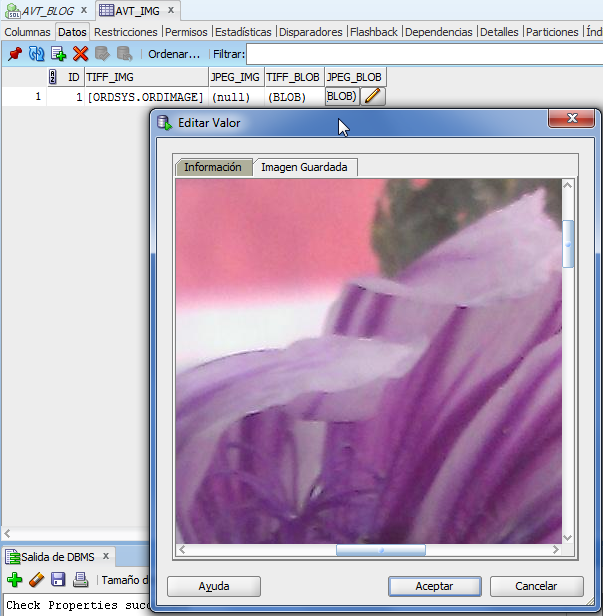
ALTER TABLE AVT_IMG ADD (JPEG_IMG ORDSYS.ORDImage, TIFF_BLOB BLOB, JPEG_BLOB BLOB);
for storing TIFF_IMG BLOB content (without metadata) and its copy in JPEG format.
The method getContent() extracts the image BLOB content.

UPDATE AVT_IMG
SET TIFF_BLOB =  ordsys.ordimage.getContent(TIFF_IMG);
COMMIT;
 
To change the image format, for instance from TIFF to JPEG, we can use the method processCopy().
DECLARE
imgTiff blob;
imgJpeg blob;
BEGIN
UPDATE AVT_IMG SET JPEG_BLOB = empty_blob()
RETURNING TIFF_BLOB, JPEG_BLOB
INTO imgTiff, imgJpeg;
-- processCopy() method gets the following parameters: 
-- * Source file
-- * Parameter string
-- * Destination file
ordsys.ordimage.processCopy(imgTiff, 'fileformat=jpeg', imgJpeg);
UPDATE AVT_IMG SET JPEG_BLOB = imgJpeg;
COMMIT;
END;
/


We can convert between the following formats: BMPF, CALS, GIFF, JFIF, PBMF, PGMF, PICT, PNGF, PNMF, PPMF, RASF, RPIX, TGAF, TIFF, WBMP.

If we want to create an ORDImage object from the JPEG_IMG BLO, this is the code:

UPDATE AVT_IMG
SET JPEG_IMG = ordsys.ordimage(
ordsys.ordsource(
JPEG_BLOB, null, null, null, sysdate, 1 ),
null, null, null, null, null, null, null );
  
The methods process() (that overwrites the source file) and processCopy() can perform more complex operations, as adjusting image contrast, scale or rotating the image. The following code performs a 90 degrees rotation.

DECLARE
imgTiff blob;
imgJpeg blob;
BEGIN
UPDATE AVT_IMG  set JPEG_BLOB=JPEG_BLOB
RETURNING  JPEG_BLOB
INTO  imgJpeg;
ordsys.ordimage.process(imgJpeg, 'rotate=90');
UPDATE AVT_IMG SET JPEG_BLOB = imgJpeg;
COMMIT;
END;
 
 
This is just a short demo of what Oracle Multimedia can do. For more info, see http://www.oracle.com/pls/db112/portal.portal_db?selected=7&frame=#oracle_multimedia.

martedì 3 dicembre 2013

Oracle Tip: OBI .rpd File path

The customer is thinking of migrating to OBIEE 11g on Exalytics. I need to migrate the .rpd file but the current installation has undergone some crazy update so it is impossible to connect and see the .rpd online in the OBIEE Client. 
The only way I had to recover the latest version of the .rpd file was locating it in the OBIEE Installation. 
The path for accessing to the current .rpd file (and previous versions of it) is: 

<OBI Root>/Middleware/instances/instance1/bifoundation/OracleBIServerComponent/coreapplication_obis1/repository